Q79 · 2210/22/O/N/25 Q2
Worked solution from the Algorithm design and problem-solving Paper 2 Algorithms, Programming and Logic booklet, Part 7 of 8.

Worked solution
(a)
Read the code and compare with what it should do. Write any five of these:
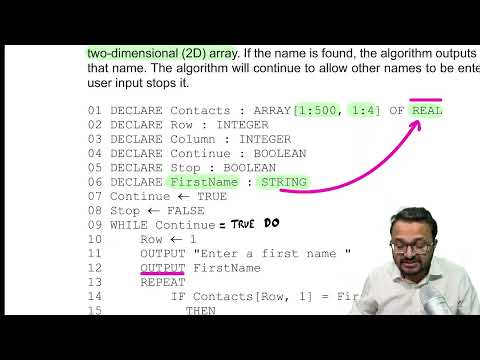
Line 01: Contacts holds names and text, so ARRAY[1:500, 1:4] OF STRING [1]
Line 12: the name must be read in, so INPUT FirstName [1]
Line 17: all four details must be output, so OUTPUT Contacts[Row, Column] [1]
Line 23: a REPEAT loop ends with UNTIL, so UNTIL Stop OR Row > 500 [1]
Line 25: Answer is not declared, so add DECLARE Answer : CHAR before line 25 [1]
Line 28: to stop the loop it must be Continue ← FALSE (a sixth error: any five score)
Only five errors are needed.
(b)(i)
Pass in the number of contacts and use it as the end of the outer loop:
PROCEDURE NewData(Number : INTEGER)
    FOR Row ← 1 TO Number
        FOR Column ← 1 TO 4
            INPUT Contacts[Row, Column]
        NEXT Column
    NEXT Row
ENDPROCEDURE
Suitable parameter: Number : INTEGER in the PROCEDURE line [1]
Outer loop ends at Number [1]
INPUT Contacts[Row, Column] [1]
Both loops closed with NEXT Column and NEXT Row [1]
(b)(ii)
Input the number, then call the procedure with it:
INPUT MyNumber
CALL NewData(MyNumber)
Correct input statement [1]
Correct call statement for NewData [1]
(c)(i)
Explain two problems with a first-name-only search. Any two of these:
There may be more than one person with the same first name [1]
The search stops at the first match, so it may output the wrong person's data [1]
If the name is not in the array there could be no output at all. This also scores, but the part is marked out of 2.
(c)(ii)
Explain how to make the search better. Any two of these:
Add more search details, such as the last name, an ID number, date of birth, contact number or post code [1]
Search the whole array to find all matches, by removing the Stop variable [1]
Use selection to output a message if the name is not found anywhere. This also scores, but the part is marked out of 2.
Official mark scheme

 ▶ Whole paper
Video solution of the whole paper · by MAK CS. Tap the picture to open it on YouTube.
Solutions follow the official Cambridge mark schemes; marks are shown in grey. Videos are from other YouTube channels. Paper codes read component / series / year: M/J = May/June, O/N = October/November. Past-paper questions © UCLES, reproduced for classroom practice.